
Step-by-step guides to create your rentals, units and tenants, manage flatshares, photos and building services, and find your way around the console.
-
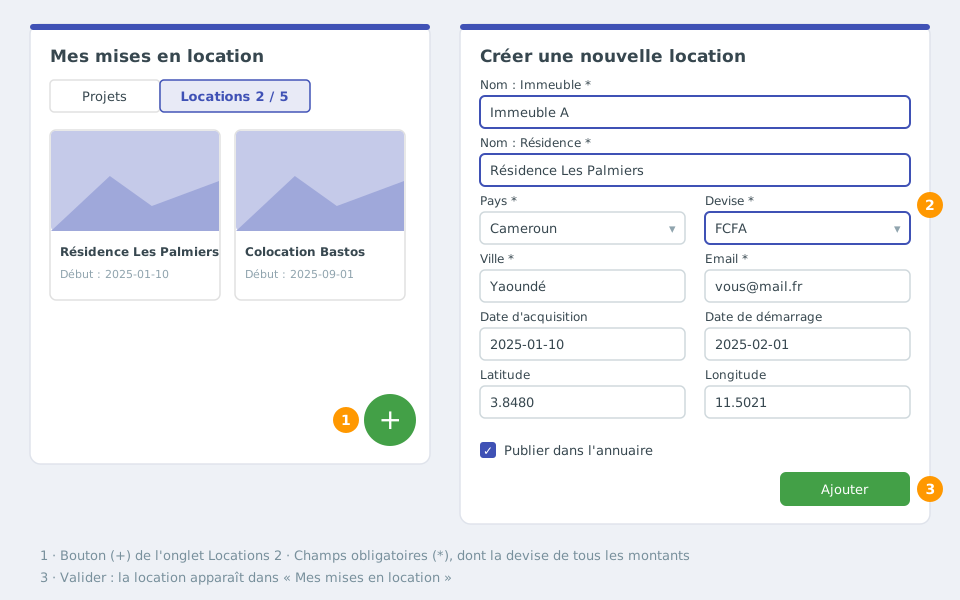
Create a rental
Step-by-step guide to create a new rental, from defining the residence to creating its units.
-
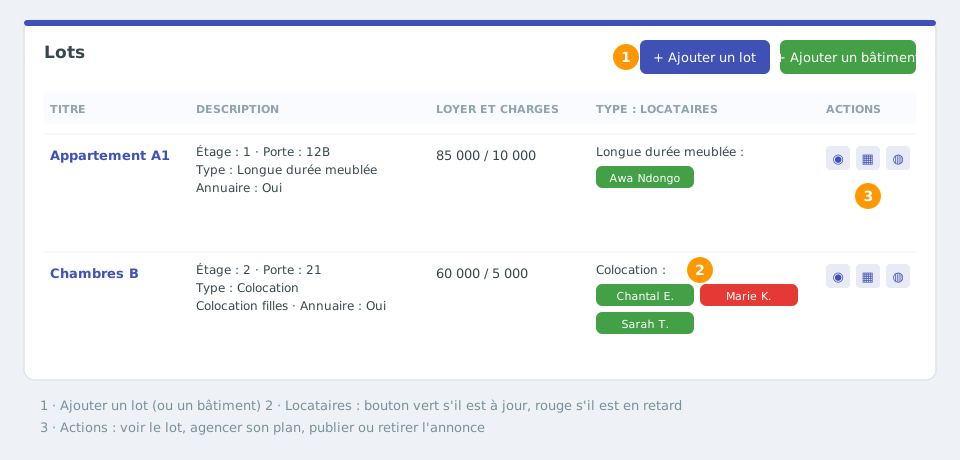
Create a unit
Create a unit (flat, room, house, parking space…): rental type, home type, floor, rent, charges, number of contracts and publication in the directory.
-
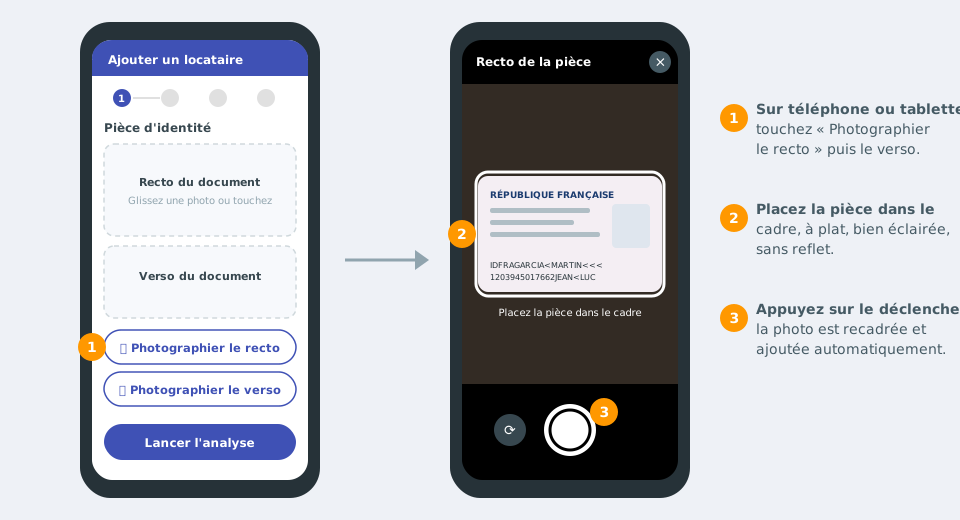
Add a tenant to a unit
Add a tenant with the 5-step wizard: photo or scan of the ID document (or take it with your phone), automatic reading of the details, lease, guarantor and confirmation.
-
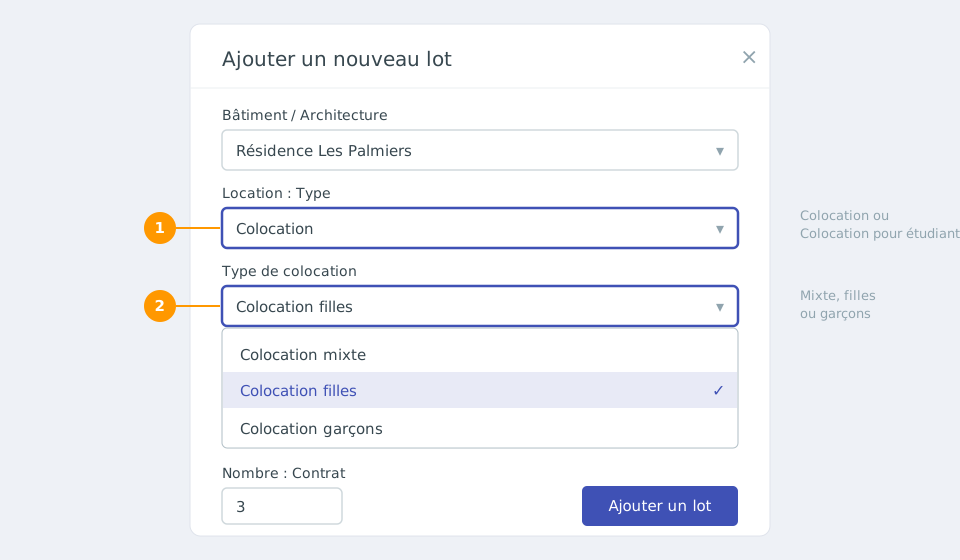
Mixed, girls-only or boys-only flatshare
Specify whether a flatshare is mixed, girls-only or boys-only: setting it when creating the unit, changing it and how it appears on listings.
-
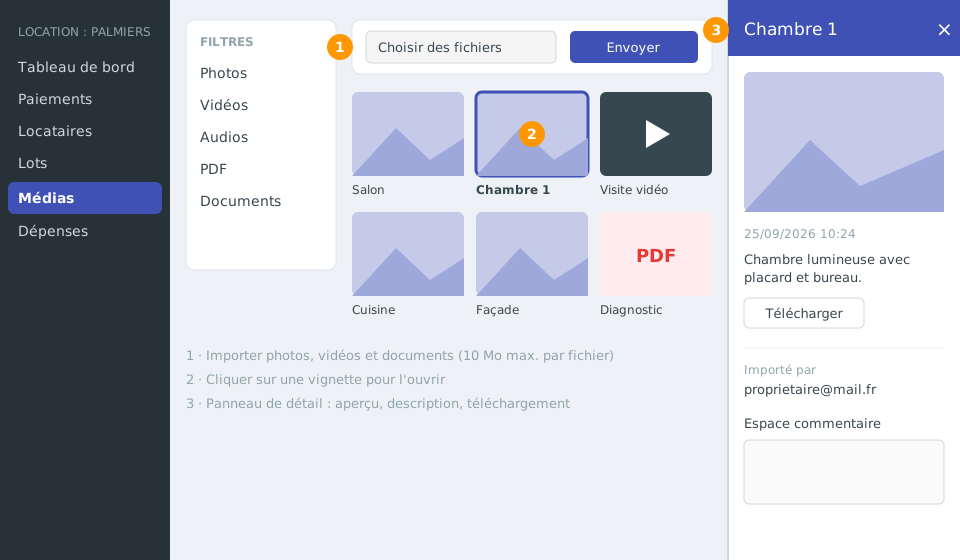
Add photos and videos to a rental
Upload the photos, videos and documents of your rental to the project media library, view them, edit them and download them with your company logo.
-
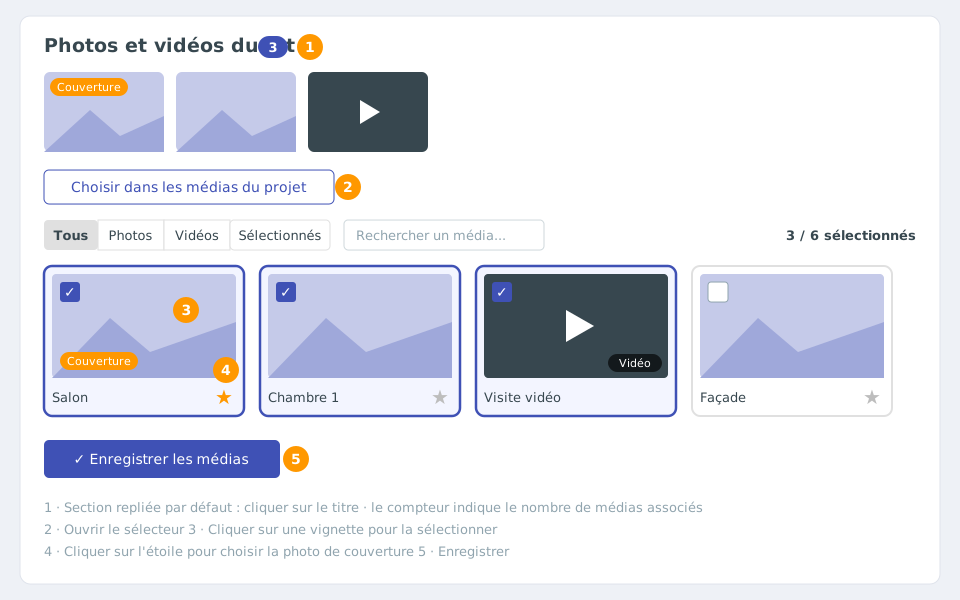
Link photos and videos to a unit
Choose from the rental's media library the photos and videos to show for a unit, set its cover photo and update its listing.
-
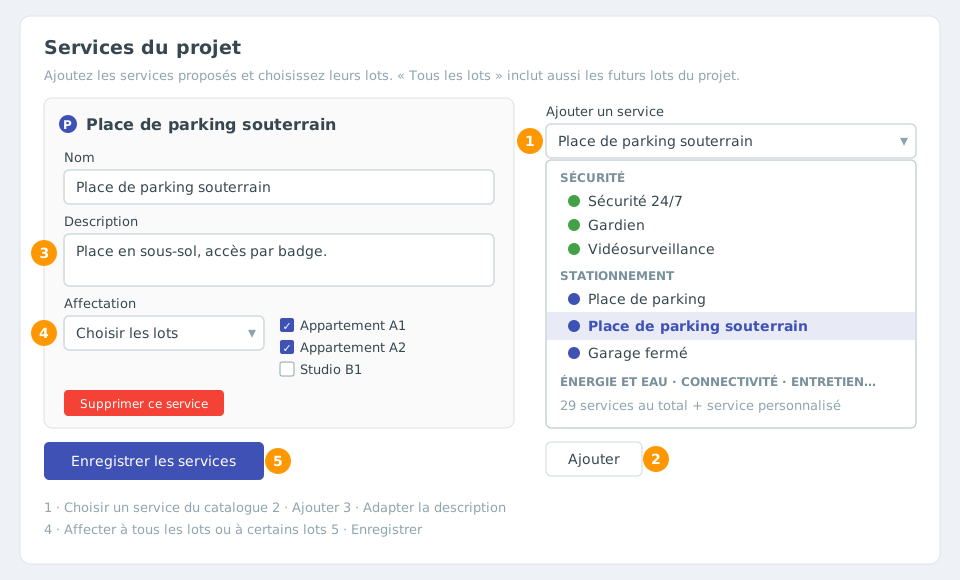
Building services: parking, caretaker, CCTV...
Present the services of your residence (parking space, underground parking, caretaker, cameras, generator, internet...) and assign them to all your units or to some of them.
-
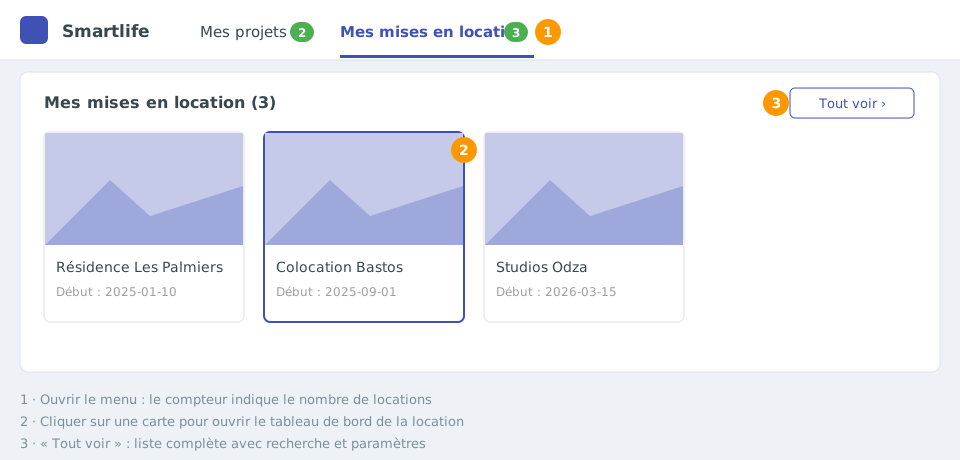
Quickly access your projects and rentals
Use the “My projects” and “My rentals” menus of the top bar to open your construction projects and your rentals in one click.
-
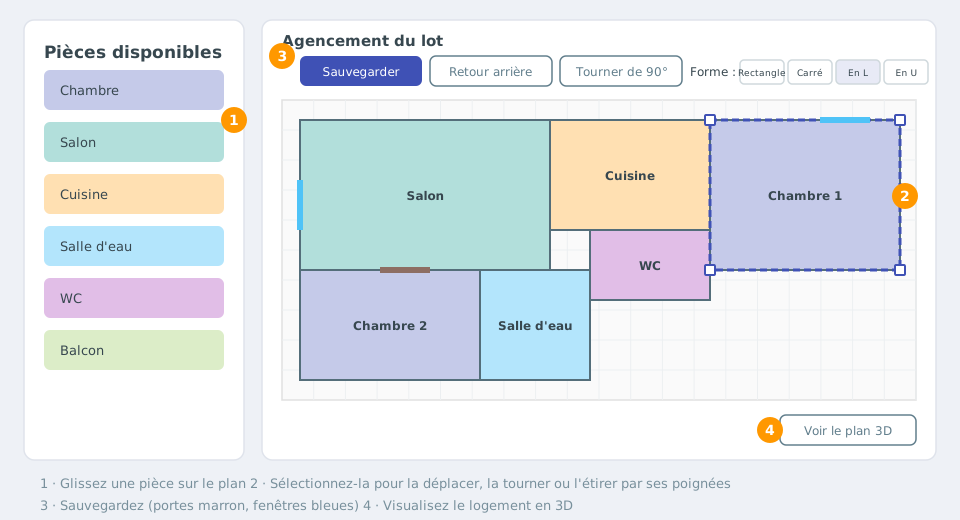
Customise the unit: rooms, equipment and floor plan
Describe a unit precisely: private and common areas, size and equipment of each room, then a 2D floor plan layout and a 3D view.
-
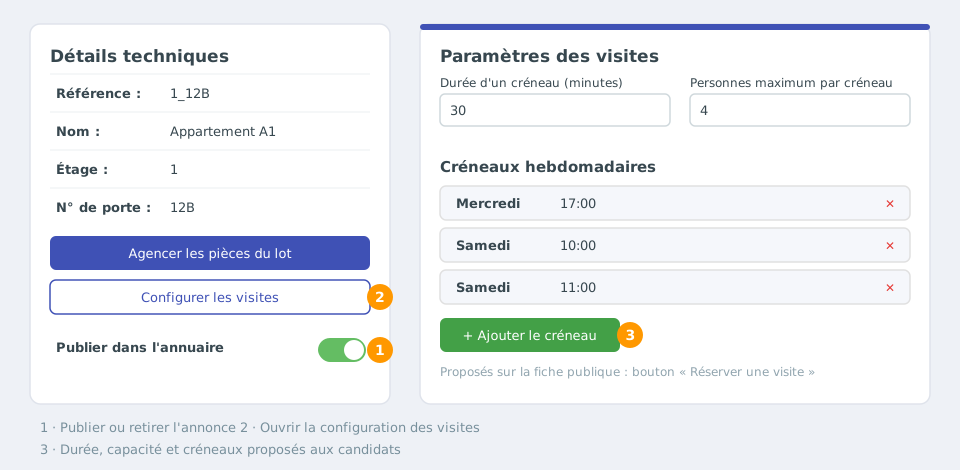
Publish the unit and organise viewings
Publish a unit in the property directory to make it visible to applicants, then offer viewing slots that can be booked online.
-
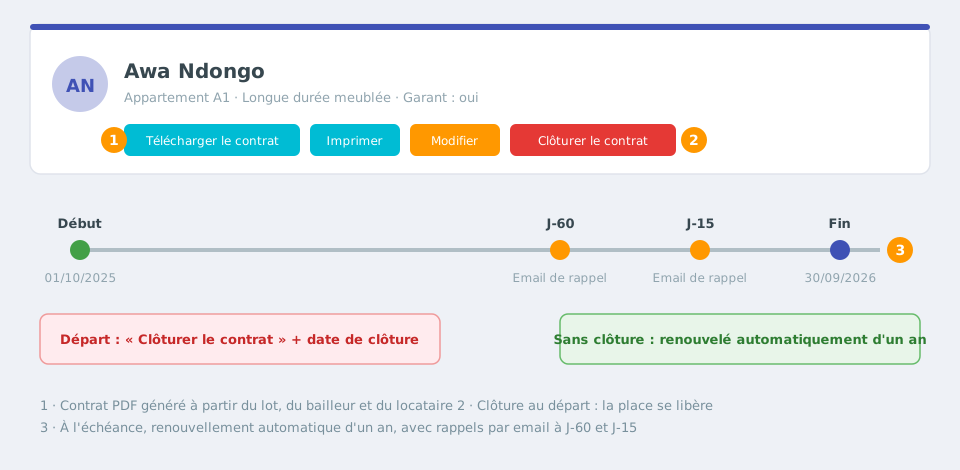
The rental agreement: download, renewal and termination
Download a tenant's lease, understand its automatic renewal and terminate it when the tenant leaves.
-
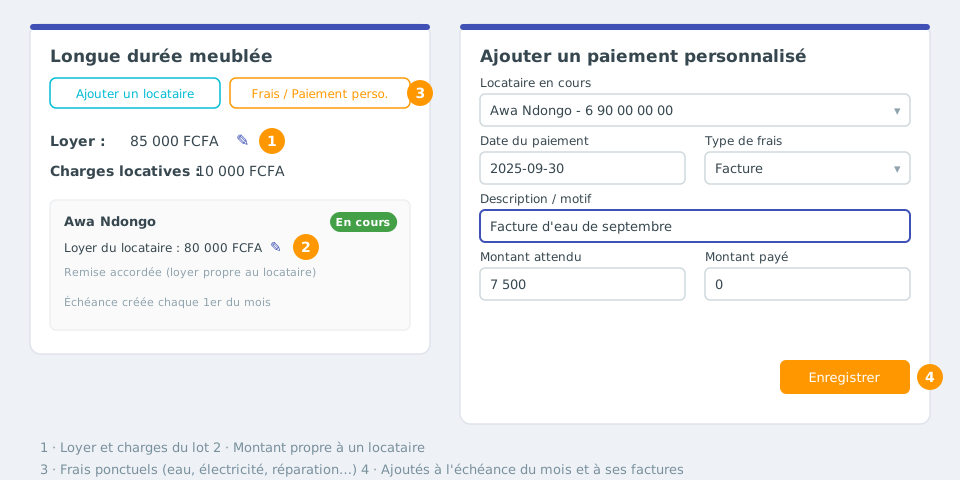
Rent, charges and fees: set and adjust the amounts
Set the rent and charges of a unit, adapt them for a tenant, and add one-off fees (repairs, water, electricity...).
-
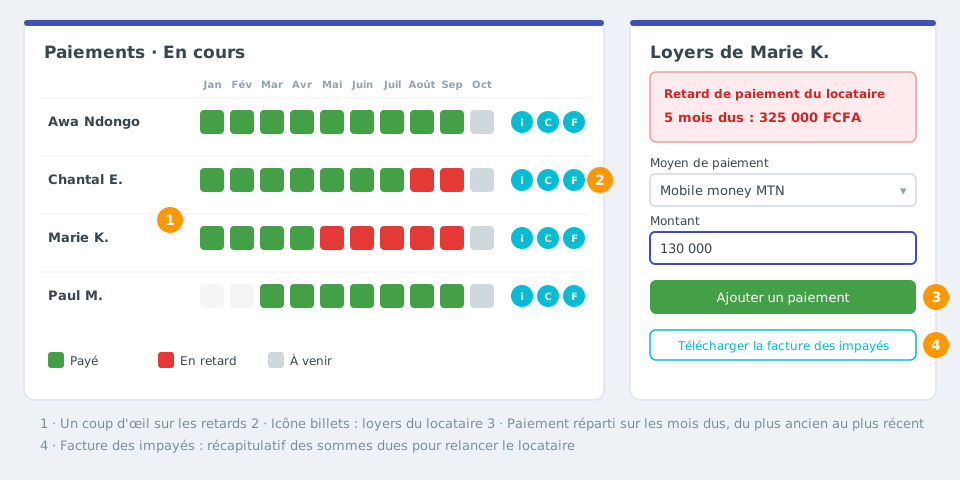
Record payments and track arrears
Record your tenants' payments, spot late payments at a glance, and chase them with the arrears invoice for effective debt recovery.
-
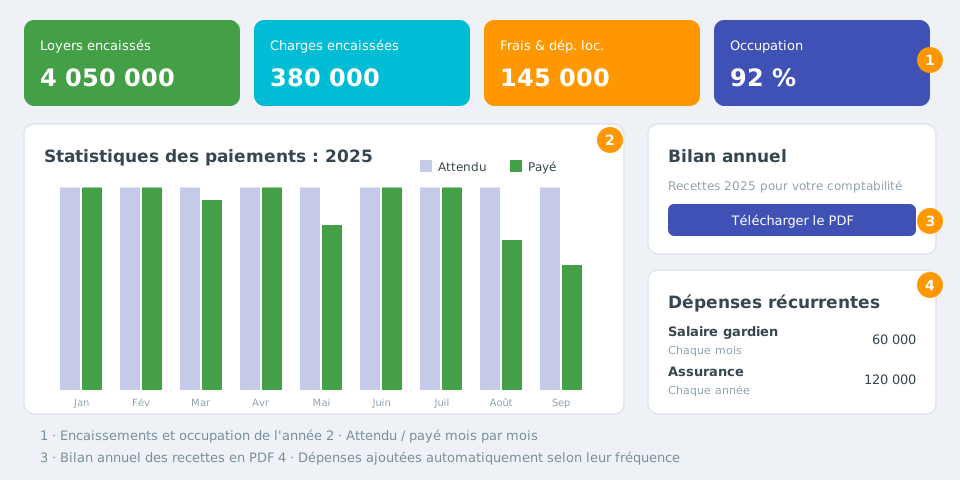
Day-to-day monitoring: dashboard, expenses and annual report
Manage your rentals day to day: dashboard of collections and occupancy, one-off and recurring expenses, annual PDF report and notifications.
-
The rental agreement: content and rules by country
What the generated lease contains and how it adapts to the country of the residence (France, Cameroon, Senegal and other African countries): term, security deposit, rent and due date, notice, flatshare, appendices.
-
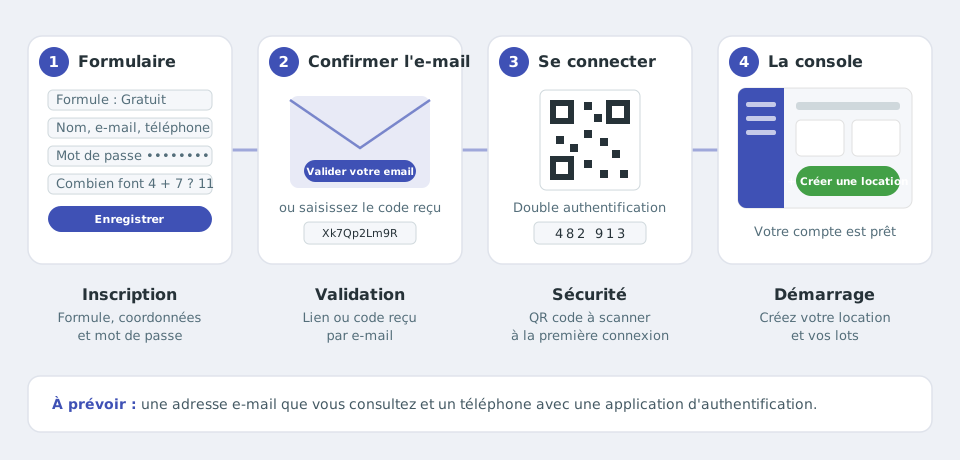
Create your account (sign up)
Sign up in a few minutes: choose your plan, fill in the form, confirm your email address, then turn on two-factor authentication when you first sign in.
-
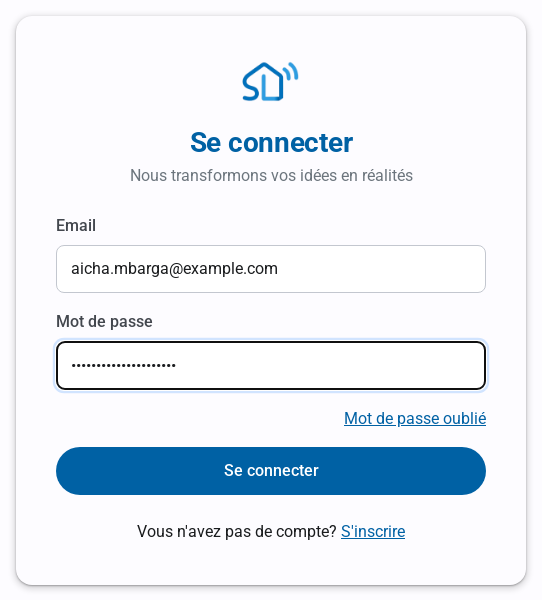
Sign in to the console
Sign in every day in two steps: your email and password, then the 6-digit code from your authenticator app. Forgotten password, refused code, signing out: answers to the common cases.
-
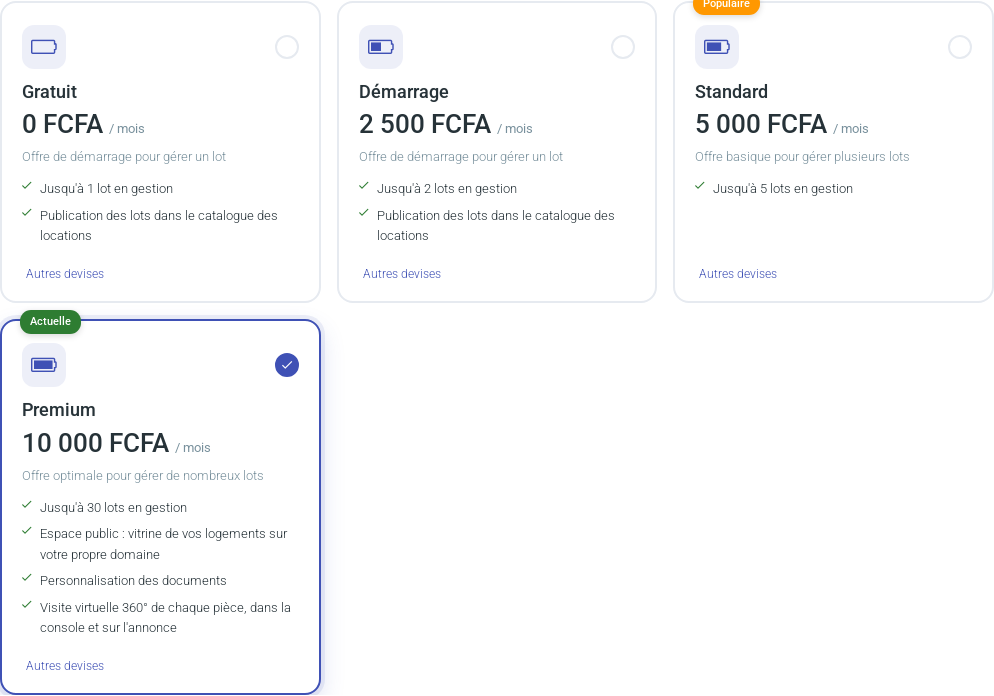
Plans: rentals, storage and options
Compare the Free, Starter, Standard and Premium plans: number of rentals, media storage, automatic emails and options (public space, document branding, 360° virtual tour). Change plan at any time.
-
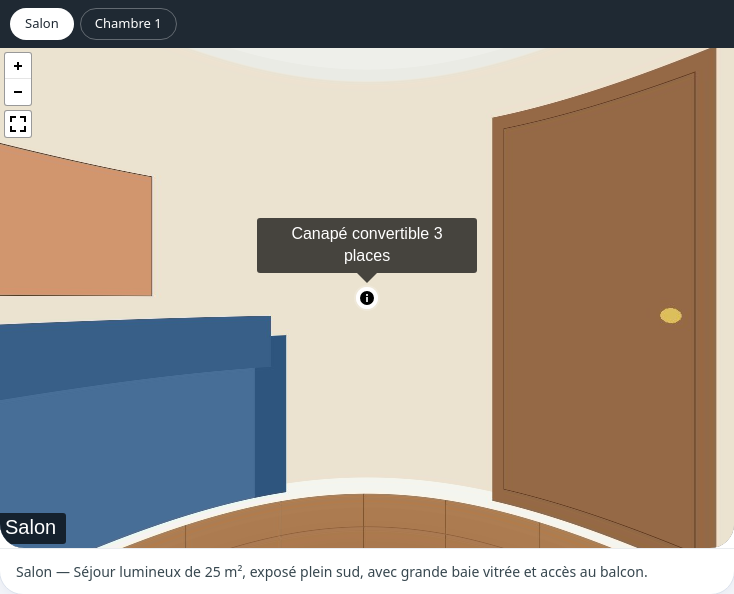
360° virtual tour of the rooms
Premium plan: upload one 360° photo per room, link the rooms together, add a description and information points, then let visitors walk through the property from the listing's “360°” tab.
-
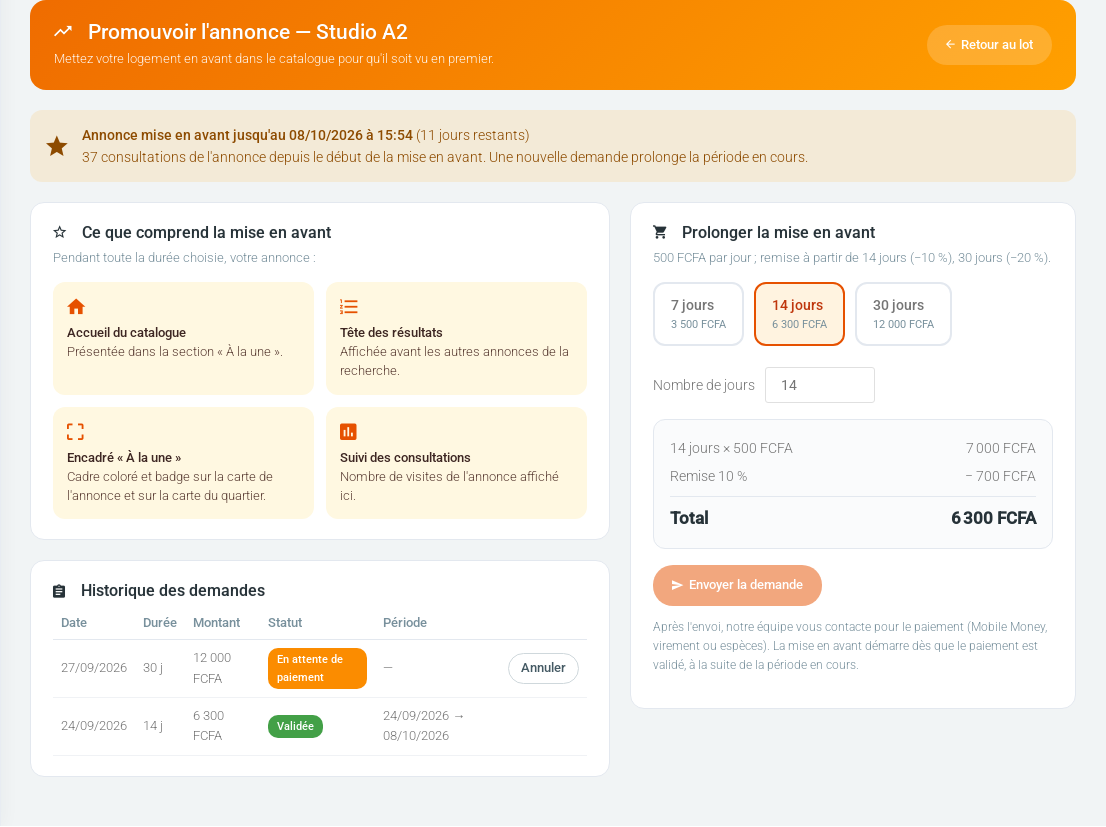
Promote your listing
Paid option available with every plan: your listing appears in the “Featured” section of the catalogue home page, at the top of search results and with a highlighted frame, for the number of days you choose.
-
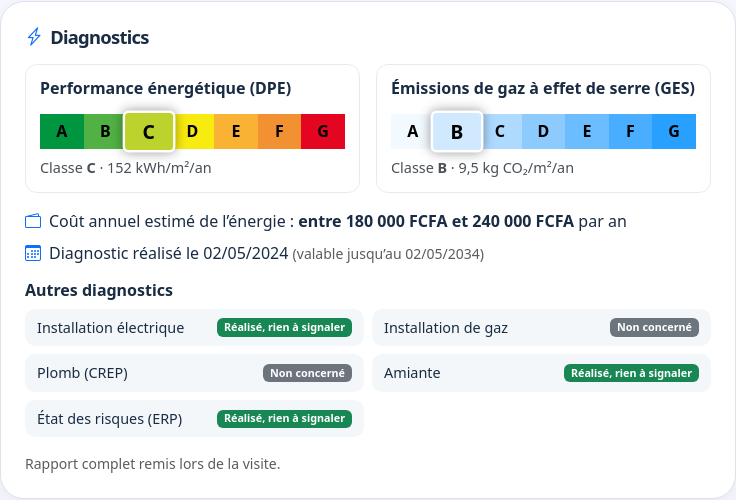
Property diagnostics: energy rating (DPE), GES and technical reports
What the energy performance rating (DPE), the greenhouse-gas label (GES) and the electricity, gas, lead, asbestos, termite and risk reports are for, when they are required, how long they remain valid, and how to enter them so they appear on your listing.
-
Seasonal rentals: rates, stays, calendar and promotions
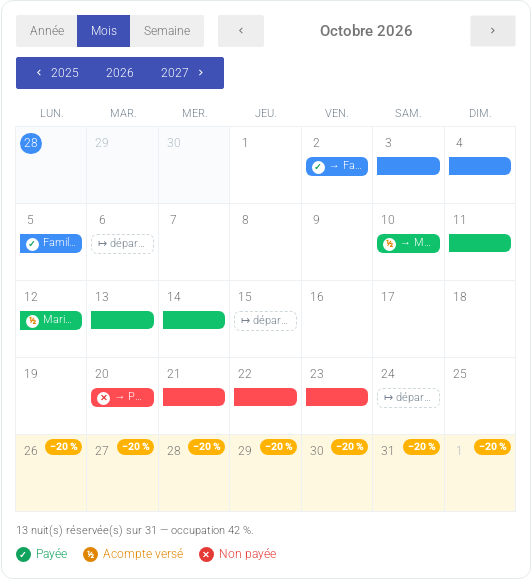
Rent a unit by the night: nightly and weekly rates, capacity, discount by number of adults, time-limited promotions, stay bookings with a calendar, payment tracking, guest profile and statistics.
-
Sync your calendars with Airbnb, Booking.com and other platforms
Avoid double bookings on a seasonal rental: send your calendar to the platforms, import theirs, and see the busy dates in the unit's calendar and on the public page. Included from the Starter plan.
-
The accounting report of a unit: every financial movement in one PDF
Download from a unit's page a dated PDF report of all its financial movements (rent, charges, payments, expenses, platform invoices, imports) to hand to your accountant. Included in every plan. With your accountant's details and supporting-document annexes.
-
Hypervision: all your rentals at a glance
Hypervision gathers the figures of all your rentals, country by country: profit, income, expenses, occupancy, collection rate and contracts ending soon. What it is for, what it calculates, how to read and use it. Premium plan only.
-
My public space: your showcase and custom domain
Create a showcase of your available units in your own style: layout, colours, home page, instant public address and custom domain. Premium plan feature.
-
Your profile: details, civil status, signature, security and branding
Everything on the Profile page: contact details, redirection address, civil status and tax notices, photo, signature, password, document branding (Premium) and API applications.
-
Online booking requests and PayPal payments
How a traveller requests a seasonal unit from the listing, how you accept or decline, and how to get paid via PayPal with a simple PayPal.Me link.
-
Receive platform invoices automatically by email
Have your Booking.com invoices recorded without typing anything: your redirection address, the subject to use with the rental ID, what is checked, and what to do when an invoice is not matched.
-
Rent control: alerts and caps by city
How the application compares your units' rent with the per-m² cap of rent-controlled cities, what the “Rent above cap” and “Rent to check” badges mean, and how to fix them.
-
Searching and comparing units in the directory (visitors)
Using the public directory: search by place, filters, map, long-term and seasonal, shared housing, currencies, country flags, detailed page, fullscreen photos, availability and sharing.
-
Listing moderation: detecting fraudulent listings
How the platform spots suspicious listings (copied photos, abnormal rent, scam wording), what “Listing removed by moderation” means and how to have it reviewed.
-
Ownership: ownership share, certificate and deeds
Why the platform asks for the ownership share of a building or unit, when a certificate or deed is required, and how these confidential documents are protected.
-
Construction projects: schedule, finances and messages
Following a building site: the Gantt chart, quotes, financial operations, media by stage, team messages and the project's architecture.
-
Electronic signature: rental agreement and inspection report
Have the rental agreement and the inspection report signed online (Premium plan): digital inspection reports, sending to signers, e-mail verification code, signature certificate, document verification and legal value.
-
Glossary: renting and rent-control vocabulary
Definitions of the terms used in the application: rent supplement, reference rent, increased and decreased reference rent, rent-controlled city, base rent, charges.