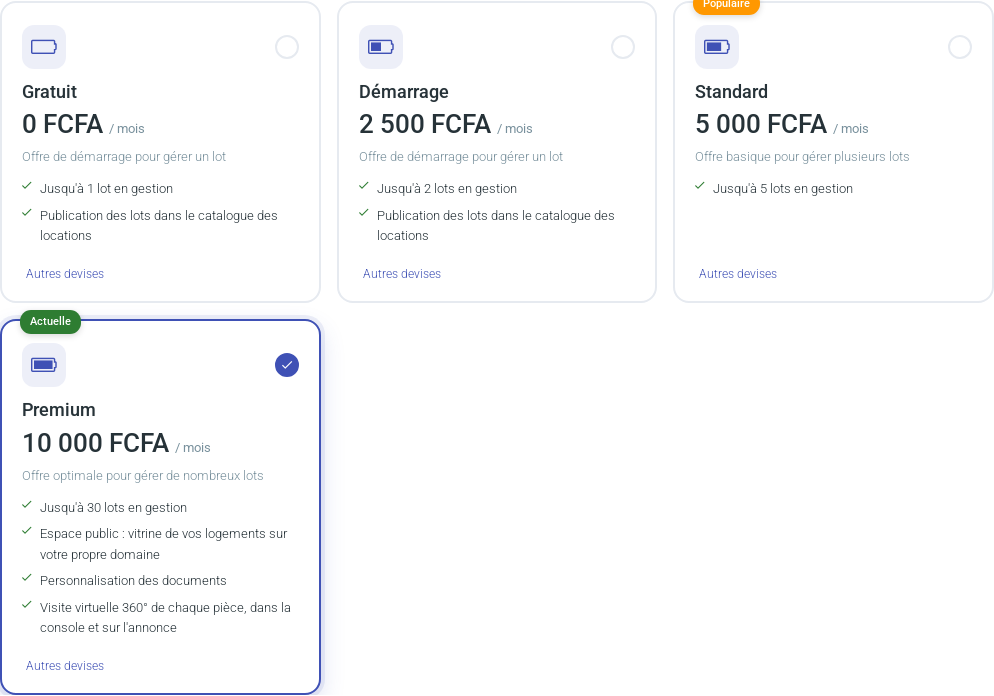
Four plans are available. The Free plan is assigned by default when you sign up: it lets you manage one rental with no subscription fee. The other three are paid, monthly or yearly. The table below is updated automatically; each plan includes everything in the previous one.
Plan
Price per month
Addresses (rentals)
Units (lots) per address
Automatic emails per month and lot
Media storage per rental
Options
Free
Free
1
1
0
2 MB
Homes published in the rental catalogue PDF report of each unit's financial movements (income, expenses, imports), ready to hand to your accountant Import of seasonal platform invoices (Booking.com, Airbnb…): sales, commissions and fees
Starter
2 500 FCFA
2
2
1
10 MB
Everything in Free, plus: Calendar sync with Airbnb, Booking.com…
StandardPopular
5 000 FCFA
5
5
2
50 MB
Everything in Starter
Premium
10 000 FCFA
30
20
10
100 MB
Everything in Standard, plus: Public space: showcase your homes on your own domain Document branding 360° virtual tour of each room, in the console and on the listing Electronic signature of the rental agreement and the inspection report
The plans as shown in “Formule et cotisation” (plan and subscription).
Address and unit: what is the difference?
Two notions work together in the plans.
An address (also called a rental or project) is a place: a residence with its buildings. Your plan limits the number of addresses (for example “Locations: 2 / 5” in “My rentals”).
A unit (lot) is a rentable home at that address: an apartment, a studio, a room… Each unit has its rooms, tenants, rents and invoices. An address therefore holds one or more units.
Example: a residence of 8 apartments is 1 address holding 8 units.
How many units per address? Each plan sets a maximum number of units per address: 1 for Free, 2 for Starter, 5 for Standard and 20 for Premium (see the table above). When the limit is reached, adding a unit is refused with a message, and the address's Lots page shows “Lots de cette location: n / limit”.
Extra units. If an address needs more units, extra units are added in packs of 10 (5,000 FCFA per month). They add to the plan's units of a single address on your account, the one you specify: your other addresses keep the plan's limit. Request them from the Smartlife team (contact@my-smartlife.fr), stating the address; the number is then set on your account.
Media storage
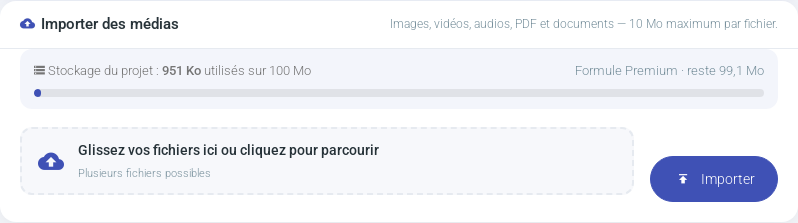
Each rental has the storage space set by your plan for its media: photos, videos, documents and 360° photos. A gauge shows it at the top of the rental's Media page.The gauge turns orange above 90% and red when the space is full.
If the chosen files exceed the space left, the import is blocked before sending, with the file size and the available space.
When the space is full, delete media you no longer need or upgrade your plan.
Each file is still limited to 10 MB (50 MB for a 360° photo).
Options included in every plan or from the Starter plan
Accounting report of a unit (income, expenses, imports) to hand to your accountant, and platform invoice import (Booking.com, Airbnb…): see The accounting report. Included in every plan.
Calendar sync with Airbnb, Booking.com and other platforms, to avoid double bookings on a seasonal rental: see Sync your calendars.
These options are included in the Starter, Standard and Premium plans. If the account goes back to the Free plan, they are no longer active; your settings are kept.
Premium plan options
Public space: a showcase of your properties on your own domain name.
Document branding: your logo and colours on agreements, receipts and reminders.
360° virtual tour: one 360° photo per room, linked together, shown in the console and in the listing's “360°” tab (see 360° virtual tour of the rooms).
If the account leaves the Premium plan, these options are no longer shown; your settings are kept and come back if you return to Premium.
Open your account menu at the top right, then Formule et cotisation (or click your plan name in the top bar). Choose the plan and the duration (for example to move from Free to Starter): with yearly payment, one month is free. Pay online, or send a request validated by our team.
The new rental limit applies as soon as it is validated.
Subscription status
The Free plan requires no subscription: it is never blocked. For paid plans, your subscription end date is shown in “Formule et cotisation”.
Expired for less than a month: you keep managing your rentals but can no longer create new ones.
Beyond one month: changes to rental management are blocked until renewal; your data remains viewable.
A banner warns you in “My rentals” with a button to renew.
Paid option: promotion
With every plan, you can promote a listing in the catalogue, per day: see Promote your listing.