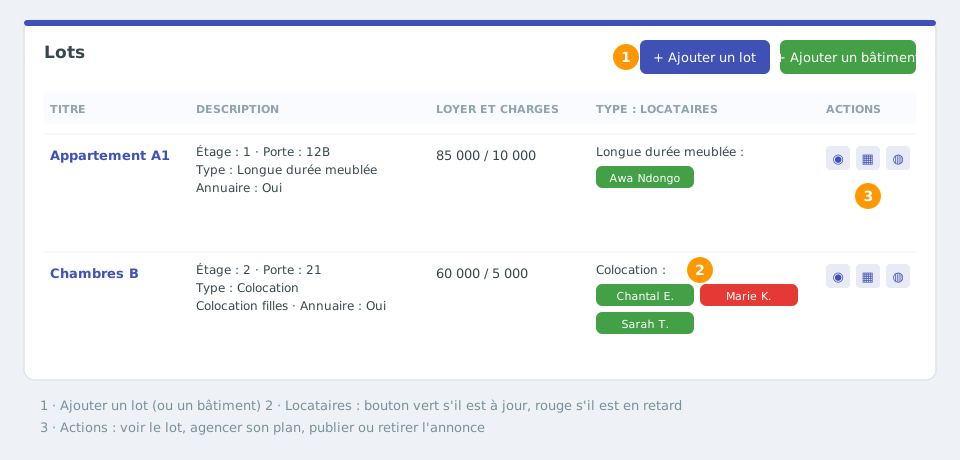
A unit is a rented space at an address: a flat, a house, a room, a rooftop or a parking space. It carries the rental type (unfurnished, furnished, student, flatshare, holiday), the rent, the charges, the tenants and their contracts.
A rental (residence) can contain one or several buildings, and each building its units. In a flatshare, a single unit groups all the flatmates.
Open the unit creation form
Open your rental, then the Rentals > Units menu. The table lists your units; at the top right, click Add a unit.
If your residence has several buildings, create them first with Add a building.
Fill in the unit details
The Add a new unit window asks for:
Building / Architecture: the building the unit belongs to.
Rental: Type: long-term unfurnished, long-term for students, long-term furnished, flatshare, student flatshare or holiday rental. For a flatshare, also specify whether it is mixed, girls-only or boys-only (see Mixed, girls-only or boys-only flatshare).
Flat: Type: room, studio (T1), T2… up to T7.
Unit name (e.g. “Flat A1”), Floor and Door no. / ID.
Monthly Rent and Service charges.
Number: Contract: number of possible tenants, editable only for a flatshare (1 otherwise).
Publish in the directory: ticked by default, the unit appears in the property search.
Seasonal unit
With the Seasonal rental type, the rent and charges fields are replaced by the nightly rate (required), weekly rate, cleaning fee, security deposit, maximum adults and children, minimum nights, adult discount, check-in/check-out times and house rules. Edit them later from the unit page, Edit settings. Details: Seasonal rentals.
Confirm and prepare the letting
Click Add a unit. The unit appears in the table with its description (floor, door, type, publication), its rent and charges, its tenants and its actions: see the unit, arrange its floor plan, publish / withdraw the listing.
In Rentals > Units, each building can be edited (name, country, details) and each unit deleted after a confirmation that shows the payments and expenses attached to it. A unit's settings (title, housing type, description, diagnostics, accountant, tax documents, seasonal conditions) are edited from its page, Edit settings button. The unit inherits the currency of the rental it belongs to.